Customer
Reviews
Logitech G13 vs. Belkin n52te
I have used both the Logitech
G13 and Belkin n52te extensively, so I thought it would be useful to
write a review comparing the two products.
Usage
I have used
both keypads to play World of Warcraft (WoW) extensively. Typically I
use the mouse to steer my character, and the keypad to do the actions on
my action bar. I use the joystick to move forward, back, and strafe
left and right. My hand is average to small in size.
Keys
The
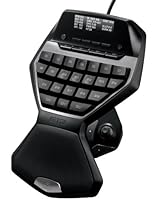
Logitech G13 has more keys than the Belkin n52te. In fact the main
reason I bought the G13 was because I ran out of keys on the n52te. The
G13 has 22 keys plus a joystick button, and two extra buttons near the
joystick for a total of 25 programable items. The n52te has 14 keys, a
scroll wheel up-down-click button, and two buttons by the joystick for a
total of 19 programmable items. When you get advanced in WoW, the more
buttons you have, the better your game will be since you can quickly do
an action by pressing a button.
The n52te keys are all pretty
much the same shape, and the middle key has a bump on it to help you
locate where you are. The G13 has the most common keys the same shape,
but other keys near the edges have a different shape. I find this
helpful since I can feel the key and know where I am due to its shape.
The G13 all has four keys with a concave impression to help you locate
where you are on the keypad. Again, I find this more useful than the one
key the n52te uses with a bumb on it.
Joystick/D-Pad
The
n52te has a D-Pad that allows you to control movement in 8 directions.
It has an optional joystick insertion that makes it feel more like a
joystick. When playing WoW, I actually only used 4 directions, and
disabled the corner directionals, since it was too easy to go the wrong
way by mistake. With just 4 directions (forward, back, strafe left,
strafe right), it was easier to use.
The G13 has a small joystick
which allows you to control 4 directions. Comparing the two, I think
the G13 is much easier on the thumb than the n52te. After hours of play,
and days of gaming, this makes a big difference. The G13 moves much
easier and with less effort than the n52te. The G13 also pivots more
naturally, so it is much easier to switch directions with less effort.
The only thing I don't like about the joystick is the joystick button is
very hard to press.
Ergonomics
I feel that the n52te
actually promotes carpel tunnel syndrome in the way its designed. The
problem is that it forces you to bend your wrist upward so that you are
continually putting stress on those tendons. The palm rest does not
help, as it simply forces this bad wrist orientation. In order to use
the n52te without pain, I actually had to prop up my elbow on some books
so that my wrist could be in a more natural position.
The
ergonomics on the G13 are far superior than the n52te. The way its
designed it allows you to keep your wrist in its natural position, as
when you are typing, without having to bend it upward as in the n52te. I
can use the G13 continuously for hours upon hours with no discomfort at
all.
LCD
The G13 comes with a LCD display, which the
n52te does not have. At first I thought I would not use it much, but now
I find it to be a helpful addition. For WoW, it shows your characters
stats as well as other things such as your equipment durability, so you
know when it is time to repair. On battlegrounds it shows stats like how
many players on each side, time elapsed, deaths, killing blows, and
honorable kills. The LCD does other stuff too when you are not playing
the game (time and date, cpu usage, stopwatch, rss feeds, music info,
etc). So I think it is a nice bonus.
Programming
I found
both units really easy to program. It is very easy to assign any
keystroke or key combinations or macros to any key on the keypad.
Conclusion
Overall,
I would say the Logitech G13 is superior than the Belkin n52te and
would highly recommend you buy the G13 over the n52te. My feeling is
that the G13 is the next generation of keypads with all the best
features, while the n52te is the old generation of keypads which has now
been surpassed.
Very Impressed
This review is somewhat
lengthy, but I try to cover all the bases on this device.
Overall
Impression: Very nice piece of hardware, worth the money.
Ok,
let's get started.
Physical Properties: The pad itself is of decent
size for someone with average to slightly-larger-than average hands. I
have long fingers and still felt very comfortable on this device. The
keys press easily and are in a comfortable layout. The joystick also
moves easily with my thumb. However, the joystick has a "click" attached
to it when you press it down which is somewhat difficult to activate
while keeping the stick still. It's definitely a hard press.
There
is a non-slip surface on the bottom to keep the unit in place which
works perfectly, as well as a comfortable semi-nonslip on the wrist/palm
rest.
The LCD is clear and brightly illuminated with
customizable lighting. There is also an on/off button for the backlight
built onto the unit so you don't have to play with lights on all the
time. The backlight for the LCD also backlights the buttons, which means
that they follow the same customizable functionality.
The LCD
also displays various, customizable, information based upon applications
you have running on your system. It has support for all the mainstream
media players to display song information, as well as RSS information,
email, etc. It also has the capability to display in-game information,
but the game itself must support this. Warhammer, for instance, does not
offer this support (that I've seen), so there are no vitals displayed
on the LCD. World of Warcraft does offer support, so by default you can
see quite a number of stats on your screen.
Software:
The G13
has its own software for assigning functions to the keypad. It also has
an application dedicated to managing the LCD display. I have not used
any other LCD / Programmable Logitech products in the past so I don't
know how this compares with them.
In the software suite, you can
scan your computer for available known games to the G13. I did not have
luck with it finding my WAR installation, but I changed the default
directory which could be the cause of this.
If it finds
compatible games it will then make available a preconfigured gaming
profile for that game. You are of course allowed to modify the profile
if you wish or you can choose to create your own custom profile from
scratch.
The profile creation is easy. It involves choosing a
name and the game/application executable file.
Once you have a
new profile, you can choose what to assign to your keys. Your options
are key combinations, macros, or scripts. The software makes assigning
each of these a snap. It only takes point and click to assign your keys
under the profile, which is auto-saved.
The software is also
where you are allowed to modify the LCD backlight color. Using the
windows built-in color chooser, you can select any value of RGB to
backlight your unit with. Each memory setting (1 - 3) can have its own
backlight. This gives you an easy way to distinguish quickly which
profile you're on.
Macros:
Macroing on the G13 is pretty
straightforward. You can launch the macro editor and begin recording
keystrokes and mouse clicks and then save them into the macro list. You
are then able to assign the macros to G-keys on the board. The macro
editor also allows you to add custom durations between events in the
macro you're recording, or it can record durations between keypresses as
you do them. I find it easier to record the macro first and then add
delays later. This is very helpful for Warhammer since it has a global
cooldown on all skills.
Scripting:
The G13 has an
implementation of the LUA scripting language available for use. It
includes most of the math libraries, strings, and some tables. Using the
LUA language, and some custom Logitech event functionality (which are
documented) you can create scripts to drive almost any aspect of the
G13. They allow you to control the LCD, moving the mouse, emulating
keypresses, etc. Once you create a script, you can assign it to a G-key
very easily by choosing it from a list.
I think that
about covers the G13. I am very pleased with having spent the money to
order it. Something to keep in mind. The G13 is fantastic for gaming,
but also has many practical uses outside of gaming. As a programmer, I
find the G13 works well inside of my IDE for quickly running commands
(compiling, debug, synchronization, etc).
I hope this helps you
out! I am also not affiliated with Logitech in any way, but I do like
their product.
Mac Gamers Rejoice! This
is one sexy beast!
Logitech stands out in a sea
of rebranded Chinese knockoffs as a bona fide design firm. In my eyes,
they are the Apple of the accessory market.
I adore my VX and MX
Revolution mice, their flywheel was a genius move and I cannot imagine
life without it. I see Logitech's industrial design is very
Porsche-like, following the Porsche dictum of "form follows function".
This
said, I have just spent my first week with their new G13 gamepad, and I
think Logitech may have raised their high bar for design. This is one
sexy beast, to be sure.
My interest in this piece was
specifically for World of Warcraft. I don't consider myself a serious
gamer, as I don't play or even really recognize a lot of the titles that
the G13 supports. I however became a Warcraft fan since my son
convinced me to open an account and go questing with him. A great family
activity, and after three years we are a 3 account family and travel
Azeroth a few hours each week as a happy pack.
My professional
background is technology design and engineering, as well as a Mac
programmer and software interface designer.
The past year or so I
had been using a Belkin Nostromo N52. I bought the device about 3 years
ago, but could not use it successfully because the Belkin Mac drivers
never worked correctly. I discovered ControllerMate, a Mac programming
utility through a friend about a year ago. It is a superb, professional
piece of software, and with it, I had the old N52 jumping through
Warcraft hoops. I was pretty happy with the N52 in this config, but
always open for a better solution. I saw a picture of the G13 about a
month ago, spotted Mac compatibility in a gaming device, no less, and I
am off to Logitech site to see more.
One of the great things
about Logitech is that when they say one of their products supports the
Mac, they actually have Mac programmers to write real software that
looks and performs up to the expectation of a veteran Mac user. The
great majority of gaming companies and devices provide little or no
support, or have a cursory piece of poorly-designed ported Windows
software that make the product much less functional on the Mac.
In
a word, the G13 piece is stunning. I don't know where to start, except
to say that the initial tactile experience with the unit exceeded my
high expectations from previous reviewers and looking at photos.
First
of all, the unit is hefty, containing a metal weight embedded in the
upper half of the unit. In photos, that large area that says G13 on the
bottom is actually a big chunk of metal. Couple this heft with a number
of large rubber feet, and the G13 literally become a component of the
surface you place it on, imparting an incredibly solid feel. On the top
of the unit, the heel of your left hand rests on a firmly-padded
textured rubber surface. It has a heavily grained leather-like feel to
it, providing a very comfortable no-slip anchor point for your hand.
The
unit is fairly large, but I have big hands and it was just perfect for
me. The arc shape mirrors the natural curve of my relaxed hand. People
with smaller hands may feel differently, but I cannot comment on that.
From
a functional/comfort perspective, after about an hour of figuring out a
basic config I liked (comes with a Warcraft profile, but I wanted it a
bit different), I played 3 hours of WoW and suffered no fatigue at all. I
look forward to making the perfect config for me over time.
Digging
a bit deeper, there are 22 numbered backlit keys on the main board
(G1-G22), with cup shapes molded into the reverse T movement keys (WASD
equiv.) so you can home in your position without looking. There is a
dedicated button to control the display and key backlighting, a small
joystick that fits under my thumb and has 3 additional buttons, one to
the left and bottom, and another is a press on the top of the stick. It
also has 4 softkeys for the applets that run in the display, and another
button to cycle through the applets. The G13 comes with 6 applets,
although only 4 work on its monochrome display. They cycle between
displaying CPU & RAM usage, Time/date, and a countdown/stopwatch
time controlled by the softkeys. There are 3rd party websites like
G15mods.com that have a growing library or compatible applets, plus the
G13 comes with an SDK to develop your own if you are so inclined.
Applications
like World of Warcraft that have G13 support, will feed their applet
into the G13 display upon opening or selecting the app. As of this
writing, the Warcraft applet is only available in the PTR beta version,
that should be released in a couple of weeks or so.
Having 3
banks of 22 keys is a lot, but Logitech made a cool way to know where
you are at a glance. The three shifted banks can change the color of the
backlighting and the display to any color you select. I chose blue for
general operation, red for raiding and green for farming. Each set has
its own optimized button functions.
There is also a button for
quick macro recording, simply hit it, select a G key or button to assign
it to, do whatever you want on your keyboard, hit the Quick Macro
again, and you have a new macro. Works great.
Another unique feature
is that your profiles and macros can be stored in the G13's own internal
memory, so you can take all you commands with you to another machine.
I
predict this will be a very popular item once folks hear about it. Buy
with confidence.
Pros -
Very Comfortable, and it is one sexy
beast, style-wise.
I love the color selectable backlighting on
the keys and display
Instant one dedicated button macro recording
is superb.
The G13 can store game profiles in the unit itself,
so you can take your macros and profiles to another computer by just
plugging in your pad.
Heavy and solid, feels like it is bolted to
the desk.
Comes with a Mac SDK for programming your own
applications for the display.
Cons, and I feel rather petty
here given how much I like the piece...
Mac software requires a
download, PC comes on a CD.
The button that is activated by
pushing the top of the joystick requires too much effort, and is not
easy to use.
Some may complain at the $80 price tag, I found it
an excellent value, really nothing else like it when you understand its
sophistication.
Would like a .pdf manual, or printed...but that
is just me. The online help and tutorials are detailed and well done.

 from Logitech:
 Winner of CES 2009 Best of
Innovations Award
Winner of CES 2009 Best of
Innovations Award




No comments:
Post a Comment